QuickTARA
Automotive cybersecurity engineering

From vehicle architecture to managed cybersecurity risk.

Model the system. Follow each attack path through it. Handle vulnerabilities for years after release. One tool on your own server, with every decision traceable.
  • ISO/SAE 21434
  • UN R155
  • EU CRA
  • Runs fully offline
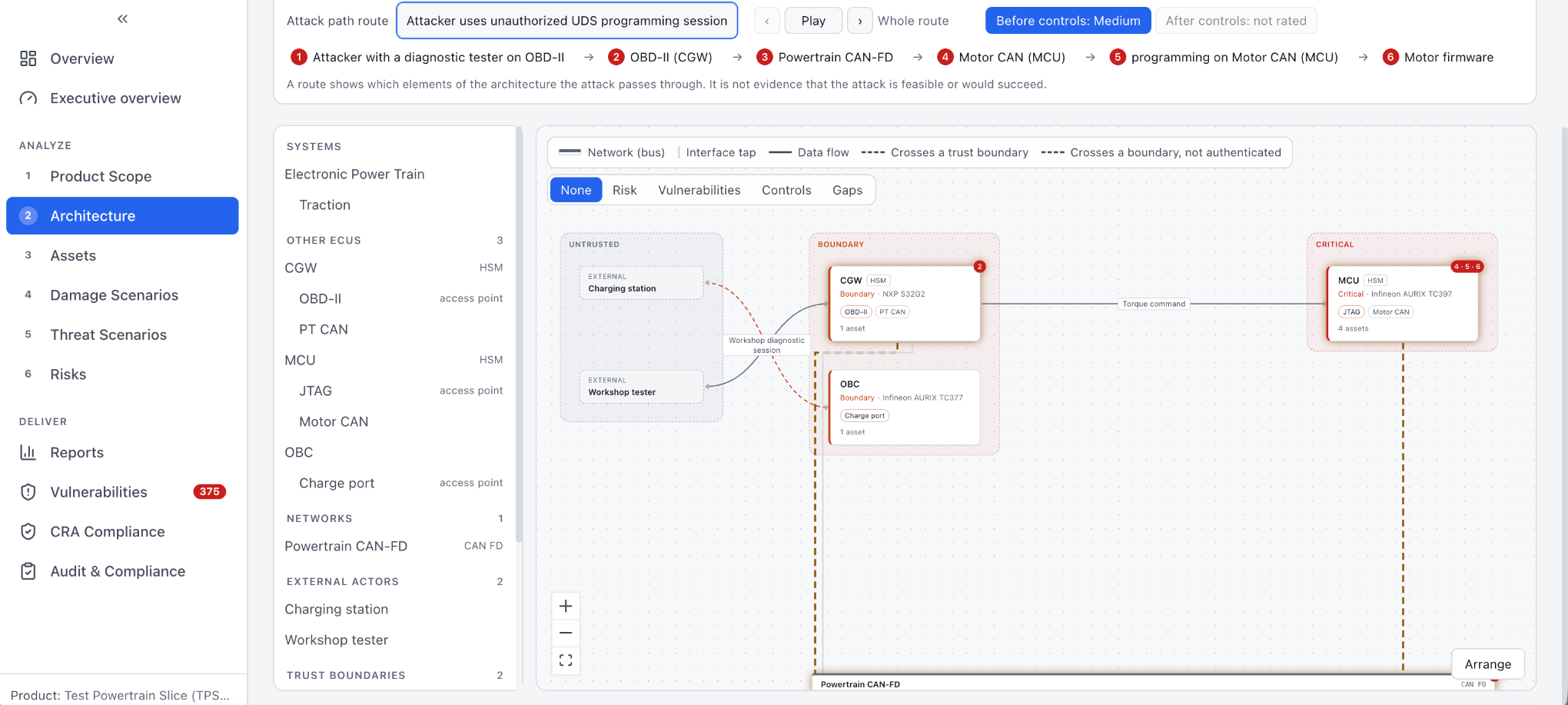
QuickTARA architecture view. An attack path route runs from a diagnostic tester on OBD-II through the gateway, the powertrain CAN-FD bus and the motor CAN to the motor controller firmware. ECUs are grouped by trust boundary: untrusted, boundary and critical.
Product video

30 seconds in the product.

Recorded in QuickTARA with a test powertrain: a gateway, a motor controller and an on-board charger.

  1. Overview
  2. Product and TARA revision
  3. Architecture
  4. Attack path route
  5. Assets
The TARA workflow

Each record points back to the architecture.

QuickTARA follows the ISO/SAE 21434 clause 15 sequence. Every threat, path and risk links to the ECU, interface and asset it came from.

  1. 01

    Architecture

    ECUs, networks, interfaces and the services each exposes.

  2. 02

    Assets

    Attached to the ECU that holds them, rated for confidentiality, integrity, availability and authenticity.

  3. 03

    Threats

    Proposed only where a route reaches the asset.

  4. 04

    Attack paths

    The steps through the architecture, rated for feasibility.

  5. 05

    Risk treatment

    Risk value, decision and linked controls.

Attack path AP-014Risk 4 · Reduce
  1. Access point
    OBD-II diagnostic connector
    Physical, workshop or owner access
    ↓ Diagnostic routing
  2. ECU
    Central gateway
    Routes diagnostic CAN to body CAN
    ↓ UDS 0x27 SecurityAccess, then 0x34 RequestDownload
  3. ECU
    Body control module
    Bootloader accepts reprogramming
    ↓ Flash write
  4. Asset
    BCM application firmware
    Property: integrity
Threat class
Tampering
ATT&CK for ICS
T0843 Program Download
Attack feasibility
Medium
Impact
Severe
One traced record, from access point to asset. Each step comes from the declared architecture.

Threat suggestions from your architecture, not a catalogue.

Engineers stop trusting a tool that proposes 400 threats for one ECU. QuickTARA only proposes what the model can reach.

  • A threat is proposed only where a route exists from an access point to the asset through declared services. No generic list to prune.
  • Every proposal names its threat class and the MITRE ATT&CK for ICS techniques behind it.
  • A rejected proposal keeps its reason. An assessor can see what you ruled out and why.
After release

The TARA stays alive after start of production.

Auditors most often find a TARA made once and never updated. QuickTARA keeps vulnerability handling in the same tool as the analysis, so a new CVE lands next to the risks it affects.

  • Upload an SBOM and tick which ECU runs each component.
  • QuickTARA matches components against OSV, NVD and the CISA Known Exploited Vulnerabilities catalogue.
  • Each finding shows the assets, threats, attack paths and risks around its ECU.
  • A finding never changes the TARA by itself. The analyst proposes a change and someone accepts it.
ISO/SAE 21434
Clause 8, continual cybersecurity activities
EU CRA
Annex I Part II, vulnerability handling
Finding · Telematics control unitChange proposed · awaiting acceptance
CVE-2023-38545libcurl 8.1.2 · SOCKS5 heap buffer overflow
Matched in
OSV, NVD
CISA KEV
Not listed
ECU
TCU-2
Linked TARA records
3
Assets
2
Threats
1
Attack paths
2
Risks
Proposed: raise feasibility of AP-022 from Low to Medium. Proposed by the analyst, awaiting acceptance.
Illustrative finding. Component, ECU and TARA records are examples.
Deployment model

Runs fully offline, inside your network.

OEM security departments and suppliers with strict IT rules approve QuickTARA without a cloud review. Vulnerability data still stays current.

  • No internet connection needed. No cloud account. No data leaves your network.
  • Advisory data arrives as signed packs. Each pack carries an Ed25519 signature, and every file inside is hash checked before import.
  • Your IT and security teams review one server, not a SaaS vendor and its subprocessors.
pack: advisories-2026-10-06
signature: ed25519 ✓ verified
files: 412 / 412 sha256 ✓
sources: osv, nvd, cisa-kev
import: ready
Illustrative import check for a signed advisory pack.
Audit evidence

Engineering evidence an assessor can inspect.

Type approval and OEM reviews ask the same questions: what did you decide, who approved it, and has it changed since. QuickTARA answers each one from records, not slides.

Locked releases

A release freezes the TARA and stores the PDF and JSON outputs with SHA-256 fingerprints. You can show exactly what was approved and when.

Full audit trail

Every change is recorded with who made it, when, and the old and new values.

Separation of duties

Nobody approves their own risk decision. The tool enforces it, so you don't rely on a process document.

UN R155 Annex 5 coverage

The coverage table against the Annex 5 threat list is generated from your TARA, not filled in by hand.

One TARA, three reports.

Each reader gets the level of detail they need. Attack details stay inside your company.

  • Internal
    Engineering report
    Full detail, including attack paths and feasibility ratings.
  • Customer
    OEM summary
    What your OEM asks for, without exposing attack details.
  • Auditor
    Assessment report
    Traceability from asset to damage, threat, risk, goal and control.
Request a redacted sample report →
Release R3 · Brake ECU platformLocked
FileSHA-256
tara-internal.pdf9f2c41e0…b7a41e
tara-customer.pdf51d0a9c3…02f6dd
tara-audit.pdfc47e18aa…9e3b10
tara.json0be6f2d4…7a55c2
Released by a Risk Manager. Audit trail attached.
Illustrative release record. File names and hashes are examples.
Who it's for

Built for how suppliers actually work.

Tier 1 and Tier 2 suppliers that owe ISO/SAE 21434 evidence to their OEMs. Makers of chargers, backends and aftermarket devices under the CRA. Consultancies that run TARAs for several clients.

For Tier 1 suppliers

One base TARA, one copy per OEM.

Keep a single platform TARA and make a copy for each OEM customer. Each copy shows what changed in the base, and the team pulls or keeps each change.

For products outside type approval

CRA built in, where it applies.

Article 14 reporting clocks, the ENISA export, Annex VII technical documentation, conformity steps and Annex II user information. For chargers, backends, aftermarket telematics and diagnostic tools.

Check CRA scope →
For embedded engineers

The engineering cost of each control.

Record CPU, memory, boot time and latency per control and per ECU, each against a budget. A control that breaks the budget shows up before the design review, not in it.

For management

Red, amber, green per product, with reasons.

The executive overview shows status per product and why. The Viewer role lets project managers and sales read the TARA without seeing attack details.

Deployment and licence

What your IT and procurement teams will ask.

Where it runs
A server inside your network. No cloud service, no outbound connection required.
Vulnerability data
Signed advisory packs from OSV, NVD and the CISA KEV catalogue, imported offline.
Access
Role-based access. Viewers read the TARA without seeing attack details.
Outputs
PDF and JSON, fingerprinted with SHA-256 at each release.
Licence
Proprietary software, licensed under a customer agreement. Pricing on request.
Evaluation
A technical evaluation on your own server, with an installation guide and direct support.
Technical demo

See it on a system like yours. 30 minutes.

A live session in the product with the engineer behind QuickTARA. No slides.

What we cover
  1. 01An ECU like yours, modelled from architecture to attack paths and risk treatment.
  2. 02An SBOM import, one vulnerability finding, and the proposed change through to acceptance.
  3. 03A locked release with the internal, customer and auditor reports.
  4. 04Your questions on deployment, IT review and licence.